Polymarket Data API v2: What Changed and How to Migrate Before October 24

Polymarket retires Data API v1 on October 24, 2026. What changed in v2 and how to migrate: cursors, renamed fields, price history and rate limits.

Polymarket is retiring Data API v1 on October 24, 2026.

If you have an application using Polymarket's Data API today, this is more than a version change. Pagination works differently, several response fields have been renamed, some endpoints have been consolidated, and price history has moved to a new API route.

The good news is that most of the migration is straightforward once you understand the differences. We tested the v1 and v2 APIs side by side against live Polymarket data to identify the changes that are most likely to break existing applications.

This guide walks through those changes, shows how to update common requests, and explains what we found when comparing the two APIs with real historical trade data.

When is Polymarket Data API v1 being retired?

Data API v2 went live on September 4, 2026. From that point forward, new Data API functionality has been added to v2 rather than v1.

The important date is October 24, 2026, when Polymarket retires Data API v1.

One endpoint is the exception:

GET /v1/accounting/snapshot

This endpoint does not have a v2 replacement and is not being retired. Applications using it can continue to call the v1 endpoint.

Polymarket also added GET /v2/tokens on October 7, 2026, providing token and condition lookup through the new API.


Key dates for the Polymarket Data API: v2 live Sep 4, 2026; /v2/tokens added Oct 7, 2026; Data API v1 retired Oct 24, 2026; Bravado's endpoints move to v2 before Oct 24; /v1/accounting/snapshot is not retired. Rate limits change from 1,000 to 200 requests per 10 seconds for price history and from 1,000 to 800 in general.

What is the Polymarket Data API?

Polymarket exposes several public APIs, each designed for a different type of data.

API

Base URL

Primary use

Gamma

gamma-api.polymarket.com

Market and event discovery, metadata, slugs

CLOB

clob.polymarket.com

Live order books, prices, midpoints, trading

Data API

data-api.polymarket.com

Trades, activity, positions, holders, open interest, leaderboards, and price history

The Data API is public and does not require an API key or authentication.

For applications that already use the Data API, the main migration work is therefore inside the requests and response handling rather than authentication.

What changed in v2?

There are five changes that matter when migrating an existing application.

1. Responses now use a data envelope

Many v1 endpoints return an array or object directly.

For example, code written against v1 may expect:

[
  {
    "proxyWallet": "0x..."
  }
]
[
  {
    "proxyWallet": "0x..."
  }
]
[
  {
    "proxyWallet": "0x..."
  }
]
[
  {
    "proxyWallet": "0x..."
  }
]

In v2, the same type of response is wrapped in a data field:

{
  "data": [
    {
      "proxy_wallet": "0x..."
    }
  ],
  "pagination": {
    "limit": 100,
    "offset": 0,
    "has_more": true,
    "next_cursor": "..."
  }
}
{
  "data": [
    {
      "proxy_wallet": "0x..."
    }
  ],
  "pagination": {
    "limit": 100,
    "offset": 0,
    "has_more": true,
    "next_cursor": "..."
  }
}
{
  "data": [
    {
      "proxy_wallet": "0x..."
    }
  ],
  "pagination": {
    "limit": 100,
    "offset": 0,
    "has_more": true,
    "next_cursor": "..."
  }
}
{
  "data": [
    {
      "proxy_wallet": "0x..."
    }
  ],
  "pagination": {
    "limit": 100,
    "offset": 0,
    "has_more": true,
    "next_cursor": "..."
  }
}

If your application currently reads the response directly, this is one of the first things you will need to change.

2. Offset pagination has been replaced by cursors

This is probably the most important change for applications pulling historical data.

v1 uses limit and offset:

/trades?market=<condition_id>&limit=10000&offset=10000

v2 uses an opaque cursor returned by the previous response:

/v2/trades?condition=<condition_id>&limit=1000&cursor=<next_cursor>

The important difference is that you should no longer try to calculate the next page yourself.

Read pagination.next_cursor, send it back as cursor, and continue until next_cursor is null.

Do not stop simply because a page contains fewer rows than your requested limit.

This also removes one of the biggest limitations of the old API. In v1, /trades rejected offsets above 10,000. That meant offset pagination could only reach the first 20,000 trades of a market before returning:

max historical trades offset of 10000 exceeded

There is no equivalent 10,000-row offset limit in v2.

3. Response fields have changed

Most v2 fields use snake_case instead of the camelCase used by v1.

For example:

proxyWallet      → proxy_wallet
conditionId      → condition_id
eventSlug        → event_slug
outcomeIndex     → outcome_index
transactionHash  → transaction_hash
proxyWallet      → proxy_wallet
conditionId      → condition_id
eventSlug        → event_slug
outcomeIndex     → outcome_index
transactionHash  → transaction_hash
proxyWallet      → proxy_wallet
conditionId      → condition_id
eventSlug        → event_slug
outcomeIndex     → outcome_index
transactionHash  → transaction_hash
proxyWallet      → proxy_wallet
conditionId      → condition_id
eventSlug        → event_slug
outcomeIndex     → outcome_index
transactionHash  → transaction_hash

But the migration is not simply a case conversion.

Some fields have actually been renamed:

asset            → token_id
curPrice         → current_price
size             → current_size
totalBought      → total_size
cashPnl          → unrealized_pnl
oppositeAsset    → opposite_token_id
initialValue     → entry_cost_usdc
asset            → token_id
curPrice         → current_price
size             → current_size
totalBought      → total_size
cashPnl          → unrealized_pnl
oppositeAsset    → opposite_token_id
initialValue     → entry_cost_usdc
asset            → token_id
curPrice         → current_price
size             → current_size
totalBought      → total_size
cashPnl          → unrealized_pnl
oppositeAsset    → opposite_token_id
initialValue     → entry_cost_usdc
asset            → token_id
curPrice         → current_price
size             → current_size
totalBought      → total_size
cashPnl          → unrealized_pnl
oppositeAsset    → opposite_token_id
initialValue     → entry_cost_usdc

This is important if you are transforming v1 responses automatically. A simple camelCase-to-snake_case conversion will not be enough.


Polymarket Data API v1 to v2 field rename map, tested on live responses: asset to token_id, size to current_size, curPrice to current_price, totalBought to total_size, cashPnl to unrealized_pnl, oppositeAsset to opposite_token_id, timestamp to last_event_at, market to condition_id, user to proxy_wallet, traded to trades.

4. Market filtering now uses condition

The v1 API uses:

market=<condition_id>

The v2 API uses:

condition=<condition_id>

For example:

curl "https://data-api.polymarket.com/v2/trades?condition=0x...&limit=1000"

The v2 API also accepts condition_id and conditionId as aliases.

A request can include up to 20 condition IDs.

5. Several endpoints have been consolidated

Polymarket has combined some of the old endpoints into broader v2 routes.

The most important examples are:

v1

v2

/trades

/v2/trades

/activity

/v2/activity

/positions

/v2/positions

/closed-positions

/v2/positions?status=CLOSED

/traded

/v2/user-stats

/holders

/v2/holders

/oi

/v2/oi

/live-volume

/v2/live-volume

/v1/leaderboard

/v2/leaderboard

/v1/builders/leaderboard

/v2/builders/leaderboard

/v1/builders/volume

/v2/builders/volume

There are also several endpoints that are new in v2, including:

/v2/user-pnl
/v2/user-volume
/v2/biggest-winners
/v2/resolutions
/v2/tokens
/v2/approvals
/v2/status
/v2/user-pnl
/v2/user-volume
/v2/biggest-winners
/v2/resolutions
/v2/tokens
/v2/approvals
/v2/status
/v2/user-pnl
/v2/user-volume
/v2/biggest-winners
/v2/resolutions
/v2/tokens
/v2/approvals
/v2/status
/v2/user-pnl
/v2/user-volume
/v2/biggest-winners
/v2/resolutions
/v2/tokens
/v2/approvals
/v2/status

Migrating historical trade data

The biggest practical improvement in v2 is cursor-based pagination.

The /v2/trades endpoint can return trades for a wallet, market, event, or the global feed.

A basic market query looks like this:

curl "https://data-api.polymarket.com/v2/trades?condition=0x962e5b226a77266ab429029ee04665e8fcfeb10b91af593786ceab871d2e945f&limit=1000"

The response contains the trades under data and the cursor under pagination:

{
  "data": [
    {
      "proxy_wallet": "0x30c43ae1...",
      "side": "BUY",
      "token_id": "96308556...",
      "condition_id": "0x962e5b22...",
      "size": 200,
      "price": 0.005,
      "timestamp": 1791473091,
      "outcome": "Yes",
      "outcome_index": 0,
      "transaction_hash": "0xf8224db4..."
    }
  ],
  "pagination": {
    "limit": 1000,
    "offset": 0,
    "has_more": true,
    "next_cursor": "..."
  }
}
{
  "data": [
    {
      "proxy_wallet": "0x30c43ae1...",
      "side": "BUY",
      "token_id": "96308556...",
      "condition_id": "0x962e5b22...",
      "size": 200,
      "price": 0.005,
      "timestamp": 1791473091,
      "outcome": "Yes",
      "outcome_index": 0,
      "transaction_hash": "0xf8224db4..."
    }
  ],
  "pagination": {
    "limit": 1000,
    "offset": 0,
    "has_more": true,
    "next_cursor": "..."
  }
}
{
  "data": [
    {
      "proxy_wallet": "0x30c43ae1...",
      "side": "BUY",
      "token_id": "96308556...",
      "condition_id": "0x962e5b22...",
      "size": 200,
      "price": 0.005,
      "timestamp": 1791473091,
      "outcome": "Yes",
      "outcome_index": 0,
      "transaction_hash": "0xf8224db4..."
    }
  ],
  "pagination": {
    "limit": 1000,
    "offset": 0,
    "has_more": true,
    "next_cursor": "..."
  }
}
{
  "data": [
    {
      "proxy_wallet": "0x30c43ae1...",
      "side": "BUY",
      "token_id": "96308556...",
      "condition_id": "0x962e5b22...",
      "size": 200,
      "price": 0.005,
      "timestamp": 1791473091,
      "outcome": "Yes",
      "outcome_index": 0,
      "transaction_hash": "0xf8224db4..."
    }
  ],
  "pagination": {
    "limit": 1000,
    "offset": 0,
    "has_more": true,
    "next_cursor": "..."
  }
}

To retrieve the next page, send that cursor back with the same request parameters.

A reusable Python cursor loop

The following pattern works across cursor-paginated v2 endpoints:

import time
import requests

BASE = "https://data-api.polymarket.com/v2"

def get_json(path, params):
    for attempt in range(5):
        response = requests.get(
            f"{BASE}{path}",
            params=params,
            timeout=30,
        )

        if response.status_code in (429, 503):
            retry_after = float(
                response.headers.get("Retry-After", 2 ** attempt)
            )
            time.sleep(retry_after)
            continue

        response.raise_for_status()
        return response.json()

    raise RuntimeError(
        f"Request failed: {response.status_code} {response.text}"
    )


def walk(path, params):
    params = dict(params)

    while True:
        page = get_json(path, params)

        yield from page["data"] or []

        cursor = page["pagination"].get("next_cursor")

        if not cursor:
            return

        params["cursor"] = cursor
import time
import requests

BASE = "https://data-api.polymarket.com/v2"

def get_json(path, params):
    for attempt in range(5):
        response = requests.get(
            f"{BASE}{path}",
            params=params,
            timeout=30,
        )

        if response.status_code in (429, 503):
            retry_after = float(
                response.headers.get("Retry-After", 2 ** attempt)
            )
            time.sleep(retry_after)
            continue

        response.raise_for_status()
        return response.json()

    raise RuntimeError(
        f"Request failed: {response.status_code} {response.text}"
    )


def walk(path, params):
    params = dict(params)

    while True:
        page = get_json(path, params)

        yield from page["data"] or []

        cursor = page["pagination"].get("next_cursor")

        if not cursor:
            return

        params["cursor"] = cursor
import time
import requests

BASE = "https://data-api.polymarket.com/v2"

def get_json(path, params):
    for attempt in range(5):
        response = requests.get(
            f"{BASE}{path}",
            params=params,
            timeout=30,
        )

        if response.status_code in (429, 503):
            retry_after = float(
                response.headers.get("Retry-After", 2 ** attempt)
            )
            time.sleep(retry_after)
            continue

        response.raise_for_status()
        return response.json()

    raise RuntimeError(
        f"Request failed: {response.status_code} {response.text}"
    )


def walk(path, params):
    params = dict(params)

    while True:
        page = get_json(path, params)

        yield from page["data"] or []

        cursor = page["pagination"].get("next_cursor")

        if not cursor:
            return

        params["cursor"] = cursor
import time
import requests

BASE = "https://data-api.polymarket.com/v2"

def get_json(path, params):
    for attempt in range(5):
        response = requests.get(
            f"{BASE}{path}",
            params=params,
            timeout=30,
        )

        if response.status_code in (429, 503):
            retry_after = float(
                response.headers.get("Retry-After", 2 ** attempt)
            )
            time.sleep(retry_after)
            continue

        response.raise_for_status()
        return response.json()

    raise RuntimeError(
        f"Request failed: {response.status_code} {response.text}"
    )


def walk(path, params):
    params = dict(params)

    while True:
        page = get_json(path, params)

        yield from page["data"] or []

        cursor = page["pagination"].get("next_cursor")

        if not cursor:
            return

        params["cursor"] = cursor

You can then retrieve every trade for a market:

condition = "0x962e5b226a77266ab429029ee04665e8fcfeb10b91af593786ceab871d2e945f"

trades = list(
    walk(
        "/trades",
        {
            "condition": condition,
            "limit": 1000,
        },
    )
)

print(len(trades))
condition = "0x962e5b226a77266ab429029ee04665e8fcfeb10b91af593786ceab871d2e945f"

trades = list(
    walk(
        "/trades",
        {
            "condition": condition,
            "limit": 1000,
        },
    )
)

print(len(trades))
condition = "0x962e5b226a77266ab429029ee04665e8fcfeb10b91af593786ceab871d2e945f"

trades = list(
    walk(
        "/trades",
        {
            "condition": condition,
            "limit": 1000,
        },
    )
)

print(len(trades))
condition = "0x962e5b226a77266ab429029ee04665e8fcfeb10b91af593786ceab871d2e945f"

trades = list(
    walk(
        "/trades",
        {
            "condition": condition,
            "limit": 1000,
        },
    )
)

print(len(trades))

The important detail is that the cursor controls where the next page begins. Keep the other filters unchanged throughout the walk.

Retrieving a wallet's full history

Wallet queries behave slightly differently.

If you need more than the default three-year window, send:

start=1
start=1
start=1
start=1

For example:

wallet = "0x30c43ae1e1b2b533e0af3488af7ff8949d9bc8e6"

history = list(
    walk(
        "/trades",
        {
            "user": wallet,
            "start": 1,
            "limit": 1000,
        },
    )
)
wallet = "0x30c43ae1e1b2b533e0af3488af7ff8949d9bc8e6"

history = list(
    walk(
        "/trades",
        {
            "user": wallet,
            "start": 1,
            "limit": 1000,
        },
    )
)
wallet = "0x30c43ae1e1b2b533e0af3488af7ff8949d9bc8e6"

history = list(
    walk(
        "/trades",
        {
            "user": wallet,
            "start": 1,
            "limit": 1000,
        },
    )
)
wallet = "0x30c43ae1e1b2b533e0af3488af7ff8949d9bc8e6"

history = list(
    walk(
        "/trades",
        {
            "user": wallet,
            "start": 1,
            "limit": 1000,
        },
    )
)

There is an important distinction here: start and end work for user queries, but they are ignored for market and event trade queries.

If you request trades by condition or event_id, Polymarket serves a fixed three-year window. If you need a narrower time range, filter the returned timestamps in your application.

What happened to the 10,000-row limit?

This was one of the biggest problems with the old API.

In v1, /trades used offset pagination and rejected requests once the offset exceeded 10,000.

That meant a market with more than 20,000 trades could not be completely traversed using offset pagination alone.

Polymarket's documented workaround was to split the request into time windows and page each window independently.

That approach works until v1 is retired.

With v2, the problem goes away because pagination is cursor-based.

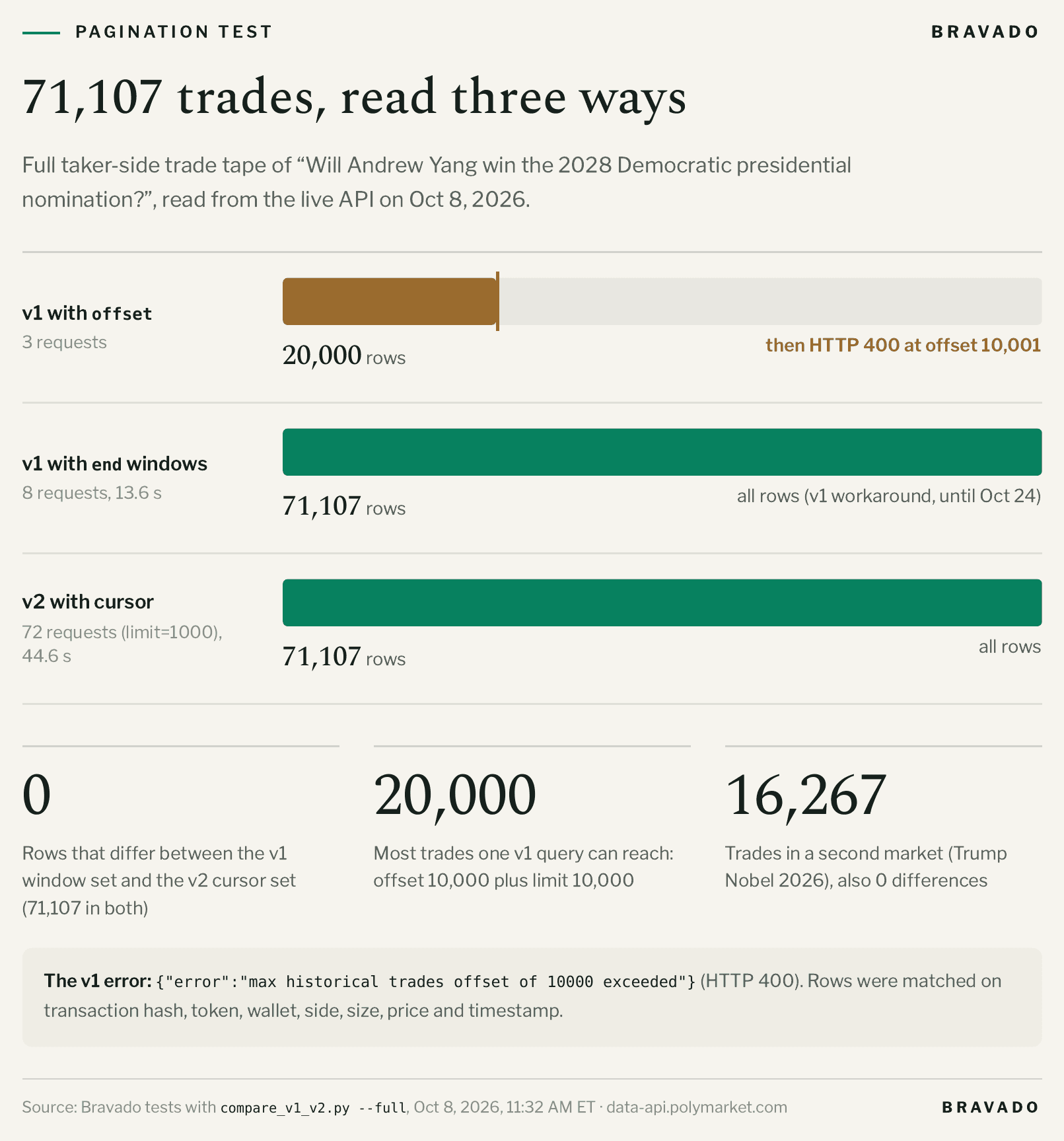
We tested this using a high-volume Polymarket market with 71,107 trades.

Method

Rows

Requests

v1 offset pagination

20,000

3, then HTTP 400

v1 time-window workaround

71,107

8

v2 cursor pagination

71,107

72


Bar chart for a Polymarket market with 71,107 trades: v1 offset paging stops at 20,000 rows with HTTP 400, v1 time windows return all 71,107 rows in 8 requests, and v2 cursors return all 71,107 rows in 72 requests, with 0 rows different.

The v1 time-window results and v2 cursor results were identical: 71,107 rows appeared in both datasets, with no rows appearing in only one version.

We performed the comparison using transaction hash, token, wallet, side, size, price, and timestamp.

Working with Polymarket price history

Price history is also changing as part of the migration.

The old route lives on the CLOB API:

GET https://clob.polymarket.com/prices-history

The v2 route is:

GET https://data-api.polymarket.com/v2/prices-history

The request format has changed as well.


CLOB v1

Data API v2

Token parameter

market

token_id

Time window

interval or startTs + endTs

interval, start + end, or as_of

Resolution

fidelity in minutes

bucket_seconds in seconds

Pagination

None

Cursor-based

Maximum limit

—

10,000

For example:

curl "https://data-api.polymarket.com/v2/prices-history?token_id=96308556109755835434254900303426519652053230974356832970824534225192181988516&interval=1d&bucket_seconds=3600&limit=3"

The response now looks like:

{
  "data": [
    {
      "timestamp": 1791385200,
      "price": 0.008,
      "resolution_seconds": 3600
    },
    {
      "timestamp": 1791388800,
      "price": 0.008,
      "resolution_seconds": 3600
    },
    {
      "timestamp": 1791392400,
      "price": 0.0085,
      "resolution_seconds": 3600
    }
  ],
  "pagination": {
    "limit": 3,
    "offset": 0,
    "has_more": true,
    "next_cursor": "..."
  }
}
{
  "data": [
    {
      "timestamp": 1791385200,
      "price": 0.008,
      "resolution_seconds": 3600
    },
    {
      "timestamp": 1791388800,
      "price": 0.008,
      "resolution_seconds": 3600
    },
    {
      "timestamp": 1791392400,
      "price": 0.0085,
      "resolution_seconds": 3600
    }
  ],
  "pagination": {
    "limit": 3,
    "offset": 0,
    "has_more": true,
    "next_cursor": "..."
  }
}
{
  "data": [
    {
      "timestamp": 1791385200,
      "price": 0.008,
      "resolution_seconds": 3600
    },
    {
      "timestamp": 1791388800,
      "price": 0.008,
      "resolution_seconds": 3600
    },
    {
      "timestamp": 1791392400,
      "price": 0.0085,
      "resolution_seconds": 3600
    }
  ],
  "pagination": {
    "limit": 3,
    "offset": 0,
    "has_more": true,
    "next_cursor": "..."
  }
}
{
  "data": [
    {
      "timestamp": 1791385200,
      "price": 0.008,
      "resolution_seconds": 3600
    },
    {
      "timestamp": 1791388800,
      "price": 0.008,
      "resolution_seconds": 3600
    },
    {
      "timestamp": 1791392400,
      "price": 0.0085,
      "resolution_seconds": 3600
    }
  ],
  "pagination": {
    "limit": 3,
    "offset": 0,
    "has_more": true,
    "next_cursor": "..."
  }
}

Choosing a price-history resolution

Polymarket keeps different resolutions for different lengths of time.

Resolution

bucket_seconds

Retained for at least

1 minute

60

7 days

5 minutes

300

60 days

30 minutes

1,800

90 days

3 hours

10,800

Permanent

12 hours

43,200

Permanent

The 12-hour series goes back to November 18, 2022.

There is also a 15-day maximum when using an explicit start and end window. For longer periods, use an appropriate interval and resolution or split the request into multiple windows.

One detail worth watching is that requesting a resolution that is no longer available for the selected time range can return an empty data array rather than an error.

Rate limits changed too

The migration also changes request limits.

Route

v1

v2

General

1,000 / 10s

800 / 10s

Trades

200 / 10s

300 / 10s

Positions

150 / 10s

200 / 10s

Activity

General

200 / 10s

Price history

1,000 / 10s

200 / 10s

Status

100 / 10s

100 / 10s

The lower price-history limit is particularly important for applications doing large historical backfills.

When the API returns HTTP 429 or 503, respect the Retry-After header rather than immediately retrying the request.

Common migration errors

A few errors showed up repeatedly during our testing.


Table of real Polymarket Data API error messages and fixes, including max historical trades offset of 10000 exceeded, 'offset' is not a query param on this API, invalid cursor, limit must be between 0 and 1000, and the 15-day price-history window limit.

offset is not a query param on this API

You are sending a v1 pagination parameter to a v2 endpoint.

Replace the offset loop with cursor pagination and pass the value from pagination.next_cursor.

invalid cursor

The cursor is invalid, expired, damaged, or belongs to another route.

Start the pagination walk again from the first page.

market is not a query param on this API

Replace:

market=<condition_id>

with:

condition=<condition_id>

limit must be between 0 and 1000

The /v2/trades endpoint accepts a maximum limit of 1,000.

'start' to 'end' must span at most 15 days

You are requesting too much price history in a single explicit time window.

Use a supported interval or split the request into multiple 15-day windows.

required query param 'token_id' not provided

The v2 price-history endpoint expects the CLOB token ID, not the market condition ID.

A practical migration checklist

Before October 24, check each place in your application that calls the Polymarket Data API.

  1. Find every reference to data-api.polymarket.com.

  2. Map each v1 endpoint to its v2 replacement.

  3. Update response parsing to read from data.

  4. Replace offset pagination with cursor pagination.

  5. Update renamed fields, not just camelCase fields.

  6. Replace market with condition.

  7. Update /closed-positions to /v2/positions?status=CLOSED.

  8. Update /traded to /v2/user-stats.

  9. Update price history to /v2/prices-history.

  10. Replace fidelity with bucket_seconds.

  11. Add handling for 429 and 503 responses.

  12. Review your request pacing against the new rate limits.

  13. Upgrade official Polymarket SDKs to 0.10.0 or later if you use them.

  14. Keep /v1/accounting/snapshot on v1.

  15. Run v1 and v2 side by side and compare the results before switching over.

If your application uses the Data API mainly for wallet trades, positions, and PnL, you can also get that data from Bravado's Data API, which reconstructs each wallet's full history from on-chain Polygon settlement.

We tested the migration ourselves

To make sure these differences were not limited to the documentation, we built a small comparison script that calls the same endpoints against both versions of the API.

The test compares renamed fields, casing changes, fields that exist in only one version, and value differences.

For full trade-history tests, it also walks the entire dataset using both pagination methods.

One of our tests produced the following result:

== trades
   RENAMED (not just case):
     asset -> token_id

== Full trade tape for this market

   v2 cursor walk: 71107 rows in 72 pages
   v1 offset walk: 20000 rows
       stopped: HTTP 400 at offset=10001

   v1 window walk: 71107 rows in 8 calls

   rows in both: 71107
   only v1: 0
   only v2: 0
== trades
   RENAMED (not just case):
     asset -> token_id

== Full trade tape for this market

   v2 cursor walk: 71107 rows in 72 pages
   v1 offset walk: 20000 rows
       stopped: HTTP 400 at offset=10001

   v1 window walk: 71107 rows in 8 calls

   rows in both: 71107
   only v1: 0
   only v2: 0
== trades
   RENAMED (not just case):
     asset -> token_id

== Full trade tape for this market

   v2 cursor walk: 71107 rows in 72 pages
   v1 offset walk: 20000 rows
       stopped: HTTP 400 at offset=10001

   v1 window walk: 71107 rows in 8 calls

   rows in both: 71107
   only v1: 0
   only v2: 0
== trades
   RENAMED (not just case):
     asset -> token_id

== Full trade tape for this market

   v2 cursor walk: 71107 rows in 72 pages
   v1 offset walk: 20000 rows
       stopped: HTTP 400 at offset=10001

   v1 window walk: 71107 rows in 8 calls

   rows in both: 71107
   only v1: 0
   only v2: 0

The migration therefore does not require rebuilding your data pipeline from scratch. But it does require changing how your application requests and parses the data.

When the official API is not enough

The v2 Data API covers most historical and account-level reads, but there are still cases where developers need data that the public API does not provide directly.

At Bravado, we are building infrastructure around those gaps.

For example, Polymarket's market WebSocket provides live trade events, but the standard trade event does not include the wallet address for each fill. Bravado's Live Trades WebSocket provides wallet-level trade data in a single stream.

We also maintain reconstructed wallet data from on-chain Polygon settlement, including trade history, redeems, splits, merges, rewards, and maker rebates.

For historical order-book analysis, Polymarket's public API does not currently provide an endpoint for retrieving historical L2 books. Bravado maintains order-book archives and can provide historical L2 data by market and date range.

The goal is not to replace Polymarket's API. The Data API is useful for many applications and is the right place to start. Bravado is designed for applications that need deeper historical data, wallet-level real-time feeds, or infrastructure that sits between raw venue data and an application.

Why use Bravado's Data API and WebSockets

The v2 migration is a good time to decide which parts of your data pipeline you want to maintain yourself. If you use Polymarket data mainly for wallet history, PnL, or a live trade tape, Bravado serves that data through one integration.

  • Full wallet history. The Trader Data API replays each wallet's history from its first trade, using on-chain Polygon settlement records and a FIFO cost-basis engine.

  • PnL already computed. Responses include realized and unrealized PnL, fees, and cost basis. Income such as maker rebates and liquidity rewards is reported separately. Numeric values are returned as JSON strings to preserve decimal precision.

  • Rate limits you can read. Every Data API response includes X-RateLimit-Limit, X-RateLimit-Remaining, and X-RateLimit-Reset. A 429 response includes Retry-After.

  • Live trades with wallets. The Live Trades WebSocket streams every fill across all Polymarket markets over one connection, with the trader's wallet address on each trade. It sends the last 200 trades on connect, so the feed does not start empty.

  • Order books for more than one venue. The order-book WebSockets carry many outcome tokens over one connection per venue, with a shared message format for Polymarket and Predict.fun.

The two main entry points are:

GET https://partner-api.bravadotrade.com/trader-analytics/traders/{address}/trades
wss://partner-api.bravadotrade.com/stream/polymarket/partner/trades
GET https://partner-api.bravadotrade.com/trader-analytics/traders/{address}/trades
wss://partner-api.bravadotrade.com/stream/polymarket/partner/trades
GET https://partner-api.bravadotrade.com/trader-analytics/traders/{address}/trades
wss://partner-api.bravadotrade.com/stream/polymarket/partner/trades
GET https://partner-api.bravadotrade.com/trader-analytics/traders/{address}/trades
wss://partner-api.bravadotrade.com/stream/polymarket/partner/trades

Requests are signed with an API key from the Bravado Console. The free tier includes 5,000 API credits per month, and each Data API request costs 1 credit. WebSockets require an eligible paid plan.

To get an API key and see what is covered, visit Bravado's Data API and WebSockets.

Conclusion

The Polymarket Data API v2 migration is relatively straightforward, but the differences are significant enough that existing v1 integrations should not be expected to work unchanged.

The biggest changes are cursor-based pagination, the new response envelope, renamed fields, the condition filter, consolidated endpoints, and the new price-history interface.

The most important thing to do now is test your existing integration against v2 rather than waiting for the October 24 shutdown.

If your application relies heavily on historical trades, start with pagination. If it uses positions or activity, audit the field names. If it uses price history, update the endpoint and resolution parameters. And if you are running large backfills, review the new rate limits before moving to production.

Polymarket's v1 API is going away on October 24. The sooner you run the migration side by side, the easier the transition will be.

Read more blogs

Trading insights, market analysis, and strategies for Polymarket prediction markets.

© 2026 Bravado. All rights reserved.

Not financial advice. Trade responsibly.

© 2026 Bravado. All rights reserved.

Not financial advice. Trade responsibly.

© 2026 Bravado. All rights reserved.

Not financial advice. Trade responsibly.

© 2026 Bravado. All rights reserved.

Not financial advice. Trade responsibly.